There are many thing you need to be aware of when browsing the internet. Anything you share online, stays online. A few tips to keep in mind while on the internet.
- Never share personal information as this allows people to track you down.
- Be careful of who you talk to because they may not be who they say they are.
- Never give anyone your passwords.
Always remember to never reply to dodgy messages or e-mails claiming that you won something especially if you never entered the competition or that you can claim money for a small fee because more likely than not, they are a scam.
Be careful of what website you look at and what you download because they can contain viruses. A quick tip is if you look at a website URL, if it has a padlock, it means it’s secure and if it doesn’t, chances are it holds some malicious software. Make sure you have an Anti-Virusactive on your PC to protect you from software threats.
Stay vigilant online, there are many great things on the internet but there is just as much people out there who are trying to harm you.
Return to Table of Contents
Encryption
Encryption is changing info before sending it over the Internet. Computer networks encrypt data to keep sensitive data like bank details safe. Data is usually encrypted by servers during Online Payment
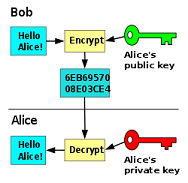
Table of contents
Internet Security
Internet security is defined as a process to create rules and actions to take to protect against attacks over the Internet. An example of Internet security is an online system that prevents credit card numbers from being stolen on a shopping website.
It also protects your passwords, not using hotspots to sign into your accounts and avoiding phishing or malware attacks from hackers and identity thieves.
The types of computer security threats are Trojan, virus and malware along with many others.
Return to table of contents
To create a Wiki page: click on “Wiki Pages” in the wordpress menu. Select “Add New”. Give the new page a Title and add the content to the page. Click “Publish” on the right of the page to make your page active.
If you wish to link certain words in the text to another page click on the icon “Add Wiki Link”. This icon is second from the right. Type in the name of the page you wish to link to and insert the text you wish to have displayed on the link. Click “Update” on the right of the page to save your changes.
To add your page to the TOC (Table Of Contents) page, click on All Wiki Pages and select “TOC”. Select “Edit” and place the cursor where you wish to insert your link. Click on the icon “Add Wiki Link”. Type in the name of the page you wish to add.
Anya Setterfield 15/12/16
“An Internet Service Provider is a company that provides you with access to the Internet, usually for a fee. The most common ways to connect to an ISP are by using a phone line (dial-up) or broadband connection (cable or DSL)” (Microsoft, 2016). Examples of modern day services offered by ISPs’ include:
Internet Connection
The process of accessing Internet services, such as the World Wide Web is usually accomplished by means of connecting to the Internet using computers and mobile devices. The purpose of an ISP is to provide the user with Internet access, and usually the stronger and faster the connection, the higher rated the ISP becomes.
Internet Security Software and Parental Controls
Internet Security is a priority for many users and specifically Internet security often focusing on browser security/network security is vital for the protection of the user’s data. Usually the more reliable an ISP’s Internet security software/parental controls are, the higher rated the ISP becomes.
Web Hosting/Domain Name Registration
The web hosting service provided by many ISP’ allows both personal and business users to put their web site/page live on a server, most commonly the World Wide Web. The registration of a domain name is usually included in the web hosting service.
TOC